 Advertisement
Trending Google Gemini AI Prompts to Generate Realistic Images That Everyone Is Creating Right Now
Trending Google Gemini AI Prompts to Generate Realistic Images That Everyone Is Creating Right Now
So you’ve probably seen those crazy realistic AI-generated images flooding your Instagram and Twitter feeds lately, right? People are creating professional-looking photos without ever picking up a camera. And honestly, it’s wild how good these images look.
If you’re curious about jumping on this trend, you’re in the right spot. I’m sharing 20 prompts that are actually working for people right now – not the generic stuff that gives you weird-looking results. These prompts create images that look real enough to fool your friends.
Why Everyone’s Obsessed with Gemini AI Images Right Now
Look, AI image generation isn’t some nerdy tech thing anymore. It’s everywhere. Google Gemini has made it stupidly easy – you literally just type what you want and boom, you get an image that looks professionally shot.
The best part? You don’t need to know Photoshop, own a fancy camera, or hire a photographer. Just describe what’s in your head and the AI does the heavy lifting. That’s why everyone from college students to small business owners is using this stuff.
Quick Tips Before You Start Creating
Here’s the thing – don’t just copy-paste these prompts word for word. They work great as a starting point, but you should tweak them to match what you actually want.
Be specific. Instead of saying “a person standing outside,” try “a 25-year-old woman in a white shirt standing in front of a modern building during sunset.” See the difference? Details matter.
Play around with the prompts. Change the lighting, switch up the background, adjust the mood. That’s how you get unique results instead of the same images everyone else is making.
Professional Portraits That Look Camera-Ready
Prompt 1: GTA V Character Style
Turn me into a Grand Theft Auto V character with that signature loading screen vibe – think bold colors, cinematic shadows, and that edgy gaming art style everyone recognizes.
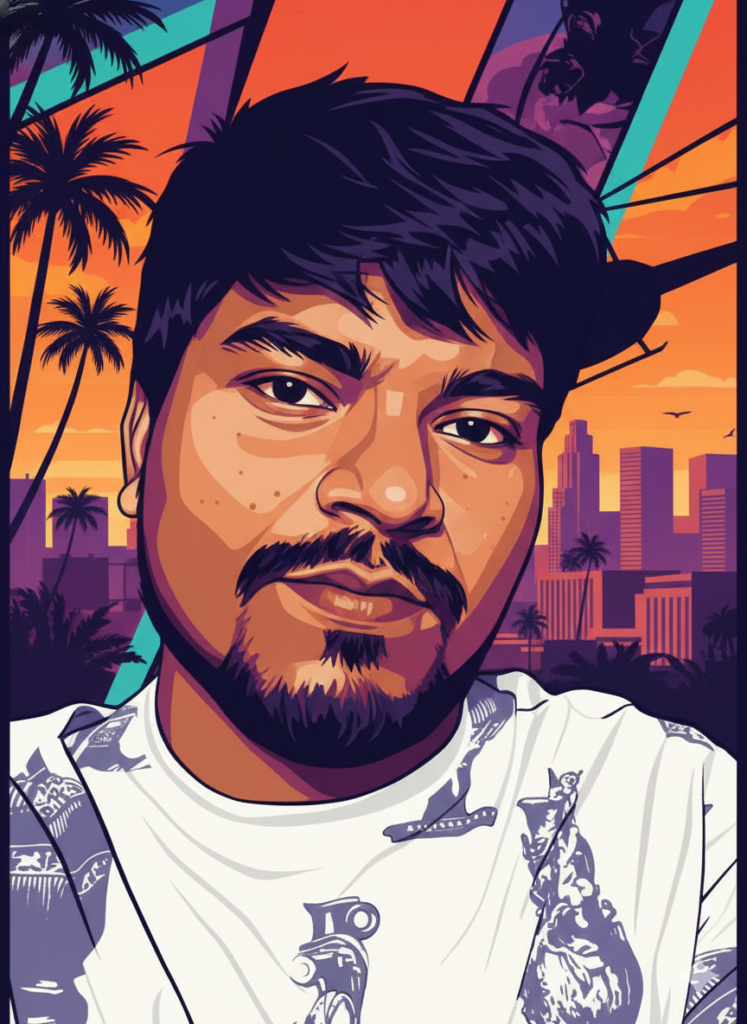
Perfect for: Gaming content, profile pictures, YouTube channel art, Instagram posts
Prompt 2: Terminator Apocalypse Selfie
Create a super realistic 3D selfie in vertical 9:16 format showing me standing next to a Terminator-style T-800 robot. Make it look exactly like a casual iPhone front camera selfie – slightly off-center framing, that typical wide-angle front camera distortion, real skin texture with pores and everything, natural daylight behind us, and an apocalyptic wasteland scene with more robots in the background. Add a tiny bit of blur like the phone moved slightly while taking the shot, and use that shallow depth effect iPhones create. Keep it looking raw and authentic like a real phone selfie, not a polished professional photo.
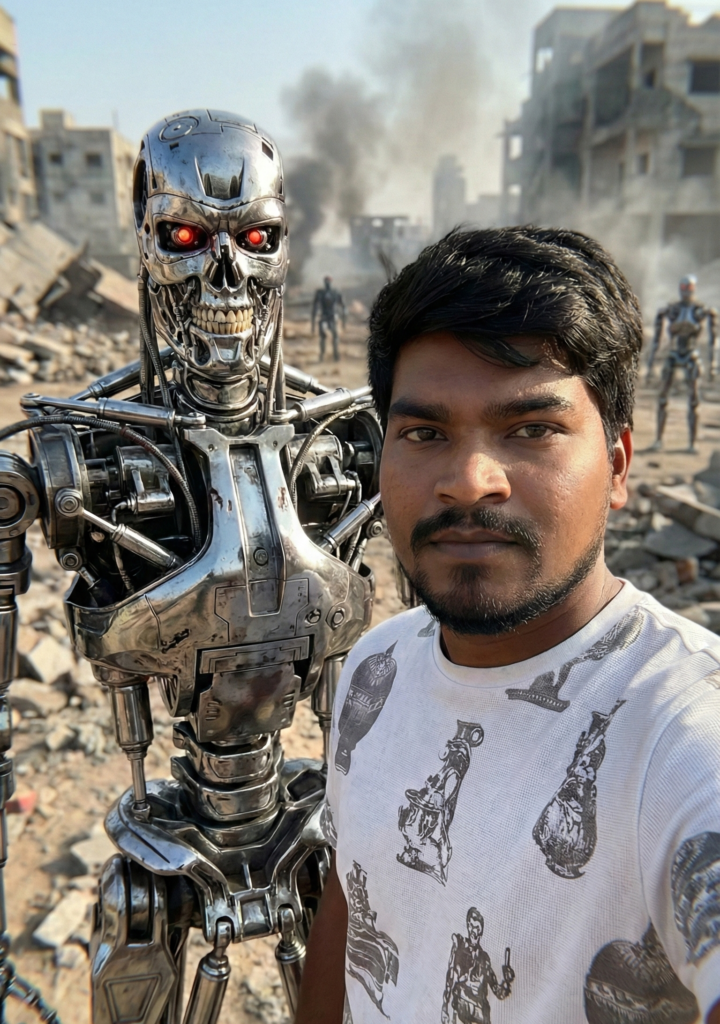
Perfect for: Instagram Reels, TikTok videos, sci-fi content, movie-themed posts, viral social media content
Prompt 3: Spiritual Lion Connection
Create an ultra-realistic emotional moment showing me standing face-to-face with a majestic lion in a snowy landscape. Our foreheads are gently touching in a peaceful, respectful connection – my eyes are closed with a calm expression while the lion’s massive mane flows in the cold wind. Light snow is falling around us, covering the ground beneath our feet. The background should be misty mountains with soft gray tones, all slightly blurred to keep focus on this powerful moment. Use natural winter lighting that’s soft and diffused, highlighting every detail – skin texture, lion’s fur, my dark coat, everything. The whole scene should feel cinematic and poetic, capturing that rare bond between human and nature. Make it look like an 8K movie still with medium close-up framing that emphasizes the emotional connection and tranquility of this incredible moment.
Perfect for: Motivational posts, nature photography content, spiritual themes, cinematic Instagram posts, wildlife art, inspirational quotes
How to Actually Get Good Results
Here’s what most people get wrong – they’re too vague. “Make me a nice photo” isn’t going to cut it.
Instead, think about: What time of day is it? What’s the person wearing? What’s the background? What’s the mood – happy, serious, confident? What kind of lighting – natural, dramatic, soft?
The more details you add, the better your results. It’s really that simple.
Also, don’t expect perfection on the first try. Sometimes you need to generate a few variations before you get exactly what you want. That’s totally normal.
Why This Matters for Your Content
Whether you’re running a blog, managing social media, or building a personal brand, these AI images are a game-changer. You can create consistent, professional-looking visuals without spending thousands on photoshoots.
I’ve seen people use these for everything – blog headers, Instagram posts, YouTube thumbnails, website banners, even print materials. The images look legit, and most people can’t tell they’re AI-generated.
Plus you can create tons of variations quickly. Need five different versions of the same concept? Done in minutes.
Mistakes People Keep Making
Don’t stuff your prompt with every adjective you can think of. Keep it clear and focused. “Beautiful gorgeous stunning amazing woman” doesn’t help – pick one style and describe it well.
Also, mention the emotion or vibe you want. A lot of people forget this part and end up with technically good images that just feel… off.
And please, customize these prompts. If everyone uses the exact same prompts, we’ll all end up with similar-looking images. Add your own twist to stand out.
What to Do with Your Images
Once you’ve generated something you like, just download it. Most platforms give you high-res versions that work for pretty much anything.
You can use these for social media, blogs, presentations, marketing materials – whatever you need. Just make sure to check the terms of service if you’re using them commercially. Google Gemini is pretty flexible about this, but it’s worth double-checking.
Feel free to edit them too. Crop, adjust colors, add text – treat them like any other photo.
Wrapping This Up
These 20 prompts are your starting point for creating realistic AI images that actually look good. You don’t need to be a tech genius or spend hours learning complicated software.
Just pick a prompt, add your details, and see what you get. Some will work perfectly right away, others you’ll want to tweak. That’s part of the fun – experimenting until you find your style.
The AI image generation space is moving fast, and now’s a great time to jump in and start creating. Have fun with it, try weird combinations, and don’t be afraid to mess around. You might surprise yourself with what you can create.